Enqueue from the admin UI
Produce jobs from the browser: the admin UI's enqueue form and how it maps onto EnqueueRequest.
Producers are usually code but they don't have to be. The admin UI can enqueue a job onto any queue from the browser, which is handy for trying out a fresh queue, kicking off a one-off maintenance job or reproducing a worker bug without writing a producer script.
Open a queue on the dashboard and pick the Enqueue tab. The form is the EnqueueRequest laid out field by field:
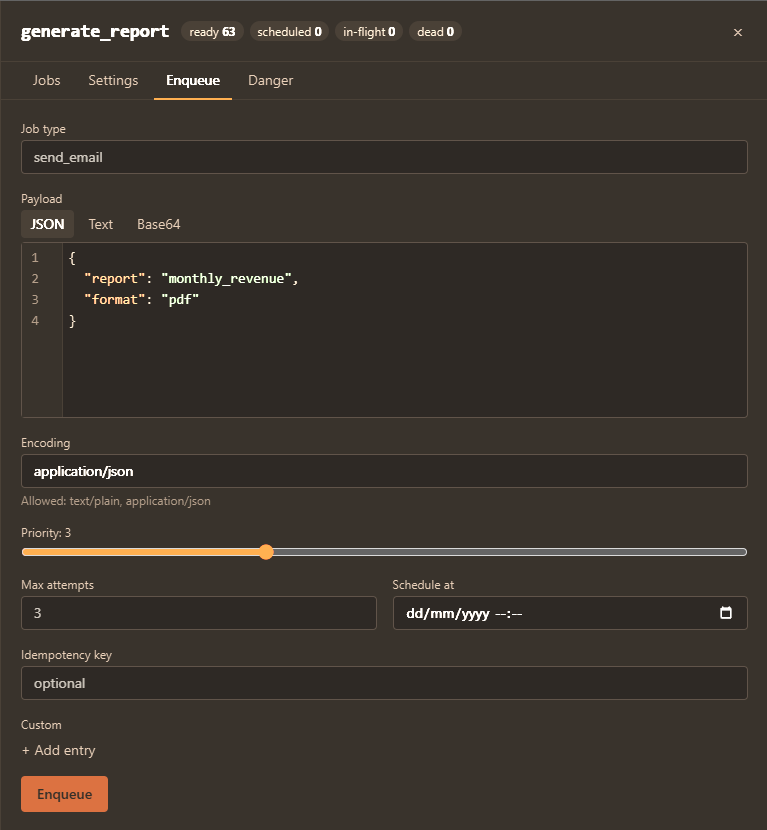
- Job type: the type tag the worker dispatches on.
- Payload: an editor with JSON, text and base64 modes plus the encoding field. The encoding suggestions come from the queue's effective
allowed_encodings. - Priority (a 0 to 9 slider) and max attempts, overriding the queue's defaults.
- Schedule at: an optional future run time.
- Idempotency key: an optional dedup key.
- Custom: key/value rows for the custom metadata map.
The job goes through the same validation as a gRPC enqueue, so the queue's limits apply unchanged and a rejection (payload too large, disallowed encoding and so on) shows up inline with the same reason a client would get. The enqueued job is durable, ordinary and indistinguishable from one a code producer sent.
When admin keys are configured, enqueueing needs the operator role or higher.
See also
- Producing jobs: the full producer API and every request field.
- Admin UI: enabling the UI and everything else it does.
- Rejection catalogue: the reasons an enqueue can be refused.